
LEGACY Media Assets: Advanced Actions - Audio Switching and Video Analysis (Deprecated)
You can switch between audio tracks in MAM. This can be particularly useful if you have a media asset with multiple audio tracks in different languages, or you have different tracks with varying sound qualities.
To configure audio switching you must do the following:
- Run the Demux plugin against your chosen asset: The Demux plugin takes a media asset (such as an MP4) containing multiple audio / video tracks and separates each of the tracks into separate .m3u8 files. Each of the .m3u8 files essentially becomes as a child of the original media asset with an origin type of “stream”.
- Run the Segment Proxy plugin against the .m3u8 files: You must run this plugin so that the audio switching feature can be used in MAM. This plugin takes several audio / video files ( .m3u8 files) and packages them as a segmented asset.
To configure audio switching, please see the Demux and Segment Proxy plugins in the Transcode Actions section.
Note:
- The Segmented Proxy plugin retrieves a list of video / audio tracks from the technical metadata stream context. If you have not specified a name for each track, a general 'audio<number>' will be assigned to each track by default. For example, audio1, audio2, audio3, audio 4, and so on.
- You cannot edit a HLS file in MAM.
To switch between different audio tracks
- Click on a media asset tile.
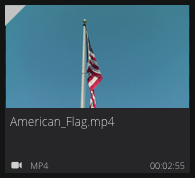
- In the Asset Summary panel, click Manage Asset.

- In the Manage Asset view, start playing the asset.
- Click the
 icon.
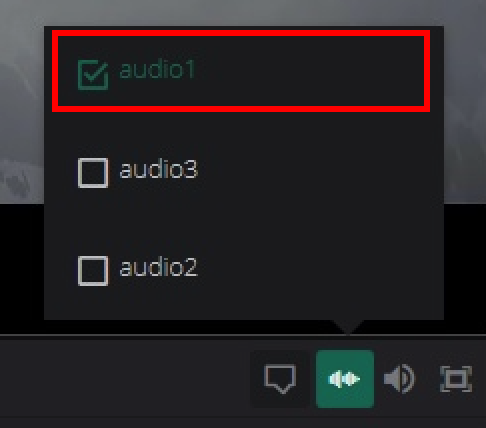
icon. - From the menu, select an audio track. The audio track is played on top of the video.
Video Analysis (Analyse Media Action)
Dalet Flex uses Microsoft's Video Indexer to analyze your videos. The Video Indexer analyzes media assets for the following things:
- Temporal Metadata: Transcripts, Faces, OCRs, and Visual Content Moderation (captured in Dalet Flex using asset metadata timelines).
- Timeline Annotations: Topics, sentiments, audio effects, annotations, participants.
- Asset Metadata Instance: Language models, participants, and face information.
Note: To configure video analysis, please see the Analyse Media section.
When you run the Analyse Media action on your chosen asset, the analysis results are shown in MAM.
Here you can see various tracks listed below the player such as Sentiments, Transcripts, Audio Effects, and Faces.

Examining Individual Results
You can examine individual analysis results. For example, you might want to look at a particular sentiment, transcript, audio effect, or face that has been picked up by the Video Indexer.
- Click the Timeline
 tab.
tab. - Click on a track icon, e.g., Faces.

- Select a result from the list.

- The player displays the result.

Editing Analysis Results
Sometimes the metadata associated with a particular result may be inaccurate. For example, the Video Indexer may pick up a face and assign it the wrong name, or it may not even be able to identify the person. In such cases you can manually correct the metadata.
- Select a result from the list.

- Click

- Correct the information.

- Click

Clearing Timelines
You can clear all the information from timelines, by selecting the Delete all previous analysis option. If this checkbox is selected and you re-run the Analyse Media action against an asset, all previously existing annotations will be deleted, and the new annotations will be generated and added in place of the old ones.
This option is located in the configuration for the Analyse Media action.

Please see the Analyse Media section for more details.
Comments
0 comments
Please sign in to leave a comment.